Start Here
Home Screen & Daily Quests
What your Home screen shows you, how the three daily quests and their reward work, and every task that can turn up in them.
Home is the screen you land on. It's built to answer one question in about five seconds: what should I do today?
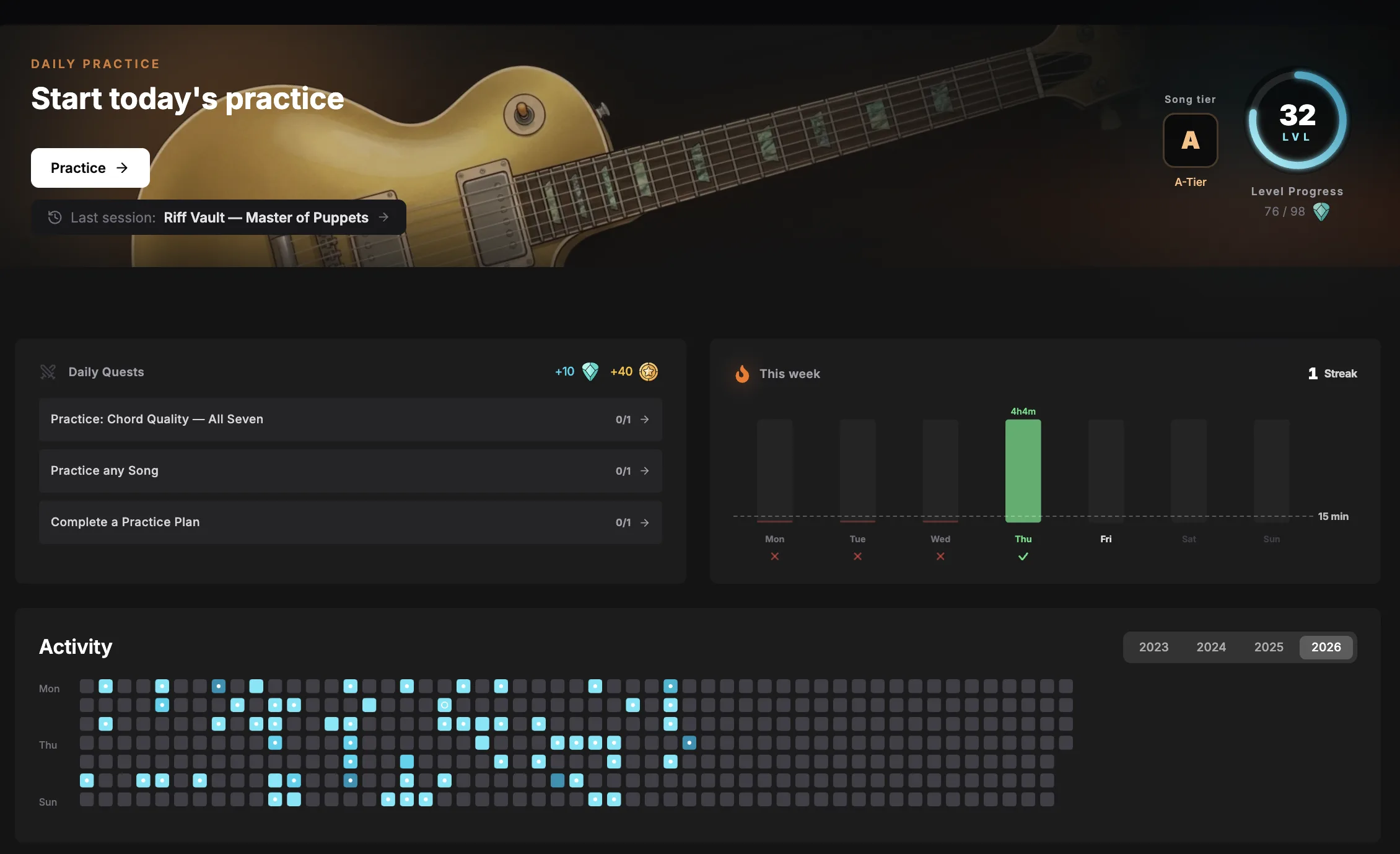
Make Home your own
The middle of Home is a stack of cards, and you decide which cards are in it and in what order. Press Customize above the cards to start.
Every card grows a small toolbar: a handle to drag it somewhere else, a switch between half and full width, and an eye to hide it.
- Add widget opens the list of everything Home can show, grouped the way the menu is: your streak, your rank, this month's challenge, recent sessions, your songs, level rewards and more. A new card lands at the bottom.
- Weekly goals is its own section in that list, with a card for every milestone. Put up the two or three you're actually chasing and leave the rest off. Each one is a single line: the goal's badge with your week drawn as a ring around it, what the goal asks for, and a Claim button the moment the reward is yours.
- Your rank shows two numbers: where you stand all-time, and where you stand in the month everyone is competing in right now.
- Shortcuts is a card of your own quick links. While you're customizing, tap the destinations you want on it. Up to eight fit.
- Reset puts the original Home back. Done closes the toolbars.
Three things stay put no matter what: the getting-started checklist at the top, and the support banner and the community feed at the bottom. They cannot be moved or hidden.
Your layout is saved to your account, so it looks the same in the browser and in the desktop app.
Some cards only appear when they have something to say. The getting-started checklist goes away on its own once you've claimed it, and the support challenge card shows up only while one is running. No need to hide them yourself.
Daily quests
Every day you get three small tasks, drawn at random from a big pool, with no two of them being the same job in different clothes. Finish all three and a Claim button appears.
 +10 points
 +40 Fame
The tasks are things you were probably going to do anyway. They tick off automatically as you practise and log, so there's nothing to mark by hand.
The reward isn't given automatically. You have to press Claim before the day rolls over. Your quest day ends at midnight where you live, so a late-evening session still counts towards the set you have been looking at all day, and a fresh set of three is waiting the next morning.
Every quest that can come up
Twenty-one tasks sit in the pool. Three are drawn from it each morning.
Time at the guitar
- Practice for 15 minutes
- Practice for 30 minutes total
One category at a time
- Practice Technique for 10 minutes
- Practice Theory for 10 minutes
- Train your Ear for 10 minutes
- Be Creative for 10 minutes
- Spend 15 minutes on Creativity
Spreading it around
- Practice 3 different categories
- Practice 2 categories for 5 min each
- Practice Technique & Theory in one session
Songs
- Rate a Song
- Rate 3 Songs
- Add song to "Want to Learn"
- Practice any Song
Routines
- Complete a Practice Plan
- Complete 2 Practice Plans
- Generate & Practice Auto Plan
Exercises and skills
- Practice a specific exercise, named on the card
- Practice 3 different exercises
- Earn points in any Skill
Habits
- Use 2 Healthy Habits
Questions people ask
I finished a quest but it still shows as incomplete
Quest progress is counted from logged sessions, so it only moves once you save the session, not while the timer is running
Can I choose my quests?
No, they're drawn for you each day. If a task doesn't suit you, skip it. Nothing is lost except that day's claim
Do quests keep a streak?
No. Only practising keeps the streak alive. Quests are a separate, single-day reward
Can I change what Home shows?
Yes. Press Customize above the cards, then drag, hide, resize or add cards. Reset brings the original Home back
I hid a card by mistake
Press Customize, then Add widget. Every hidden card is in that list
Can I put a single weekly goal on Home?
Yes. Every milestone is its own card under Weekly goals in the Add widget list, and you can claim its reward straight from the card