Practice
The Desktop App
What the Windows, macOS and Linux app adds over the website: guitar input straight off your interface, lower latency, and a few things a browser tab simply can't do.
riff.quest runs perfectly well in a browser, and nothing in this article is needed to practise, log sessions or climb the rankings. The desktop app exists for one reason: a browser is a bad place to plug a guitar into. Everything about audio gets better once the app talks to your interface directly.
It's the same account and the same data. Log a session on the desktop, and it's there in the browser on your phone a second later.
Getting it
At the bottom of the left-hand menu there's a Get the desktop app card. It's there on the website and disappears once you're running the app, which is a decent way to tell which one you're in.
The whole point of installing it is that the audio feels better. The browser hands your guitar through several layers of microphone plumbing before riff.quest ever sees it; the app opens your interface itself, through the driver. Two things change, and they're the reason to bother:
- It runs smoother. Fewer dropouts, fewer moments where the detection stalls mid-run and you can't tell whether it was you or the software.
- The latency drops. Not to zero — no computer does that — but far enough that the gap between playing a note and the app reacting stops being something you notice while you play.
Everything else on this page is a nice extra. That's the headline.
Which file do you want?
Downloads live on the releases page: github.com/Michaljapko/riff-quest-releases/releases. Take the newest release at the top, open Assets underneath it, and pick the one file that matches your machine.
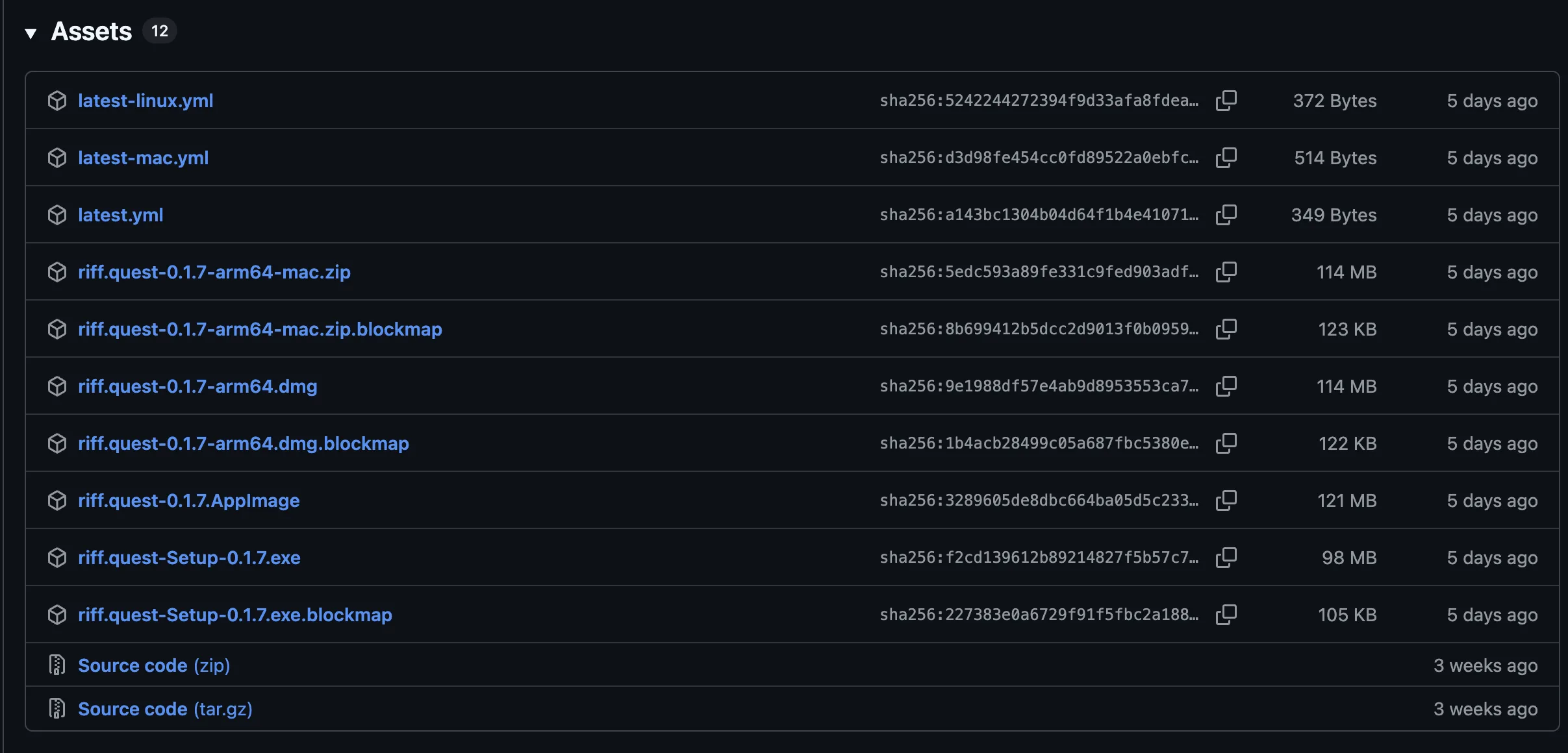
- Windows
- riff.quest-Setup-[version].exe — the ordinary installer, double-click and it's done
- macOS, Apple Silicon
- riff.quest-[version]-arm64.dmg — open it and drag the app across. The -arm64-mac.zip next to it holds exactly the same app, for when you'd rather not mount a disk image
- macOS, Intel
- There isn't one. Intel Macs stay on the website
- Linux
- riff.quest-[version].AppImage — mark it executable and run it, no installation
Ignore everything else on that list. The .yml files and the .blockmap files are how the app checks for and downloads its own updates later; downloading them by hand does nothing. Source code is the project, not the program.
The builds aren't signed with a paid certificate, so the first launch gets stopped: Windows shows a SmartScreen panel, where More info → Run anyway gets you through, and macOS refuses a plain double-click, where right-click → Open does. It's a one-off, per install.
After that it updates itself. When a new version has downloaded you get a notice with a button to restart into it, so you only visit that page once. Very old installs eventually stop being accepted and will ask you to download a fresh one, so take the restart when it's offered.
What you actually get
- Direct guitar input
- The app opens your audio interface itself, through the driver, instead of going through the browser's microphone plumbing. Lower latency, no permission dance, and it picks up the actual guitar channel
- Choose your input properly
- Pick the device, pick the channel your jack is on, and set the buffer size. Small buffer, less delay. Too small, crackling
- Your screen stays awake
- Reading tabs while playing means long stretches with no keyboard or mouse. The app tells the system to leave the display alone
- Session progress on the taskbar
- The dock or taskbar icon fills up as the exercise runs
- Quick actions from the tray
- Jump straight to Home, My Exercises or your Practice Log without finding the window first
- A little badge on your avatar
- Other players see a small monitor icon next to you in the online strip. Purely for show
Is it worth it for you?
Yes, easily. This is the setup the whole thing was built for, and it's where the smoother, lower-latency input actually shows
Not really. Detection works either way, and you gain very little
Stay on the website. Nothing about your progress is missing there
Worth it for the tray, the quick actions and the screen not dimming mid-exercise
Questions people ask
Do I need it to use note detection?
No. Detection works in the browser through a microphone or an interface. The desktop app just makes it faster and more reliable
Is it a paid feature?
No, the app comes with the account
Does practising in the app count the same?
Identically. Same points, same streak, same skills, same rankings
Can I use both?
Yes, and most people do: the desktop app at the guitar, the website on a phone to check the rankings
Which file do I need?
One per system: the .exe on Windows, the arm64 .dmg on an Apple Silicon Mac, the .AppImage on Linux. Intel Macs aren't built for
My computer says the app isn't safe
That's the missing signing certificate, not a problem with the download. Windows: More info, then Run anyway. macOS: right-click the app and choose Open
The app says it's too old to run
Your install missed its updates. Download the current one from the link on that screen and you keep everything