Goals and Rotation
Get faster at what matters. Keep what you already have.
Set a tempo goal on an exercise and climb to it in small steps, 3 clean runs at a time. Then put what you can play into a rotation, and let it tell you what has gone too long without playing.
Free with your Riff Quest account. Goals need a microphone; rotation does not.
- exercises can take a goal
- 120
- exercises can take a goal
- clean runs per milestone
- 3
- clean runs per milestone
- things in a rotation
- 60
- things in a rotation
Finger Permutations — 3-2-4-1
80/ 120 BPM
- Next lesson of my courseYour ownCooling down
- Seven Nation ArmySongFresh
Climb
A finish line for one exercise
Practising a drill at the same tempo for months is how a plateau happens. A goal gives it a top, and a ladder of milestones on the way, so every session is aimed at the next rung.
- Pick an exercise and two temposWhere you can play it today, and where you want it. Any exercise with a tab works, the ones you wrote yourself included.
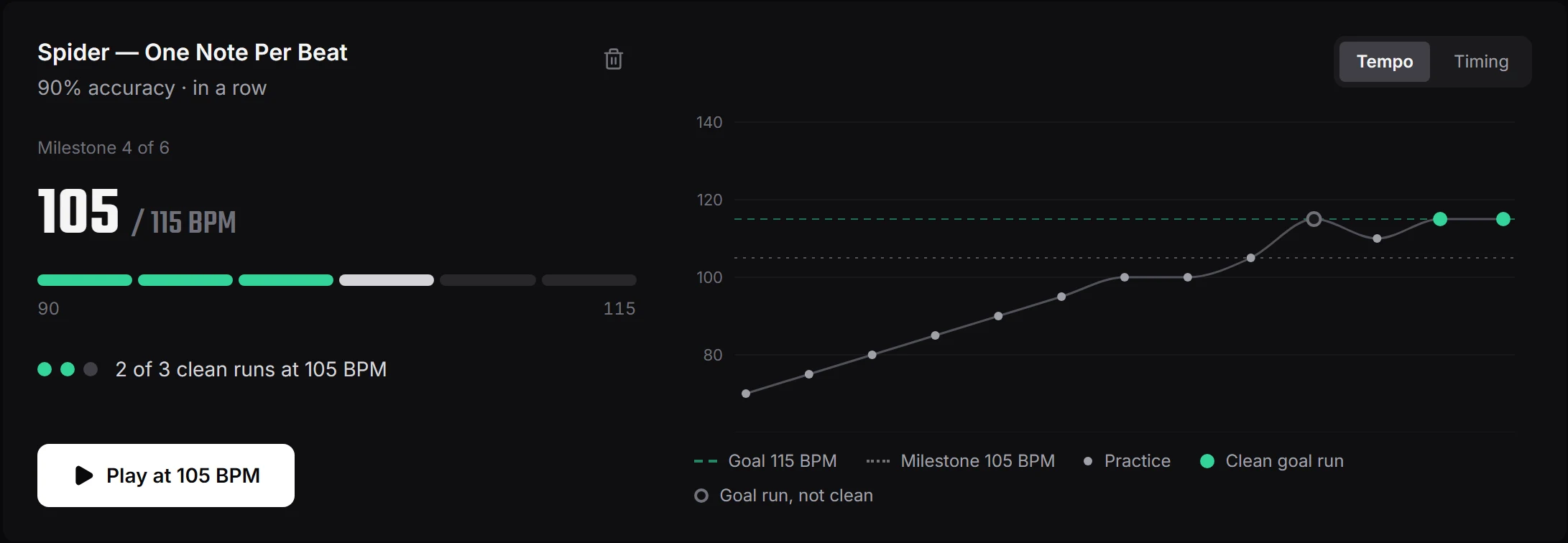
- Milestones in betweenThe climb is cut into round steps, 5 BPM at a time, with bigger steps on a long climb so there are never more than 16.
- 3 clean runs per milestoneA run counts when the microphone scores it at the milestone's tempo with enough accuracy: 80%, 90% or 95%, your choice. In a row, or in total.
- A chart of the whole way upEvery scored run of that exercise played on its own lands on one chart, tempo or timing, practice runs included, so you can see the climb that got you there.
- 80
- 85
- 90
- 95
- 100
- 105
- 110
- 115
- 120
9 milestones, up to 5 BPM apart, each cleared by 3 runs at 90% or better: 27 clean runs to the top.
Keep
What you can play, still playable next month
A song you nailed in spring is gone by autumn if nothing reminds you to play it. Rotation keeps track of when you last played each thing and brings up whatever has sat the longest.
- Anything you do not want to loseSongs from your library, exercises, whole skills, or your own items with a note and a link, such as the next lesson of a course. Up to 60 of them.
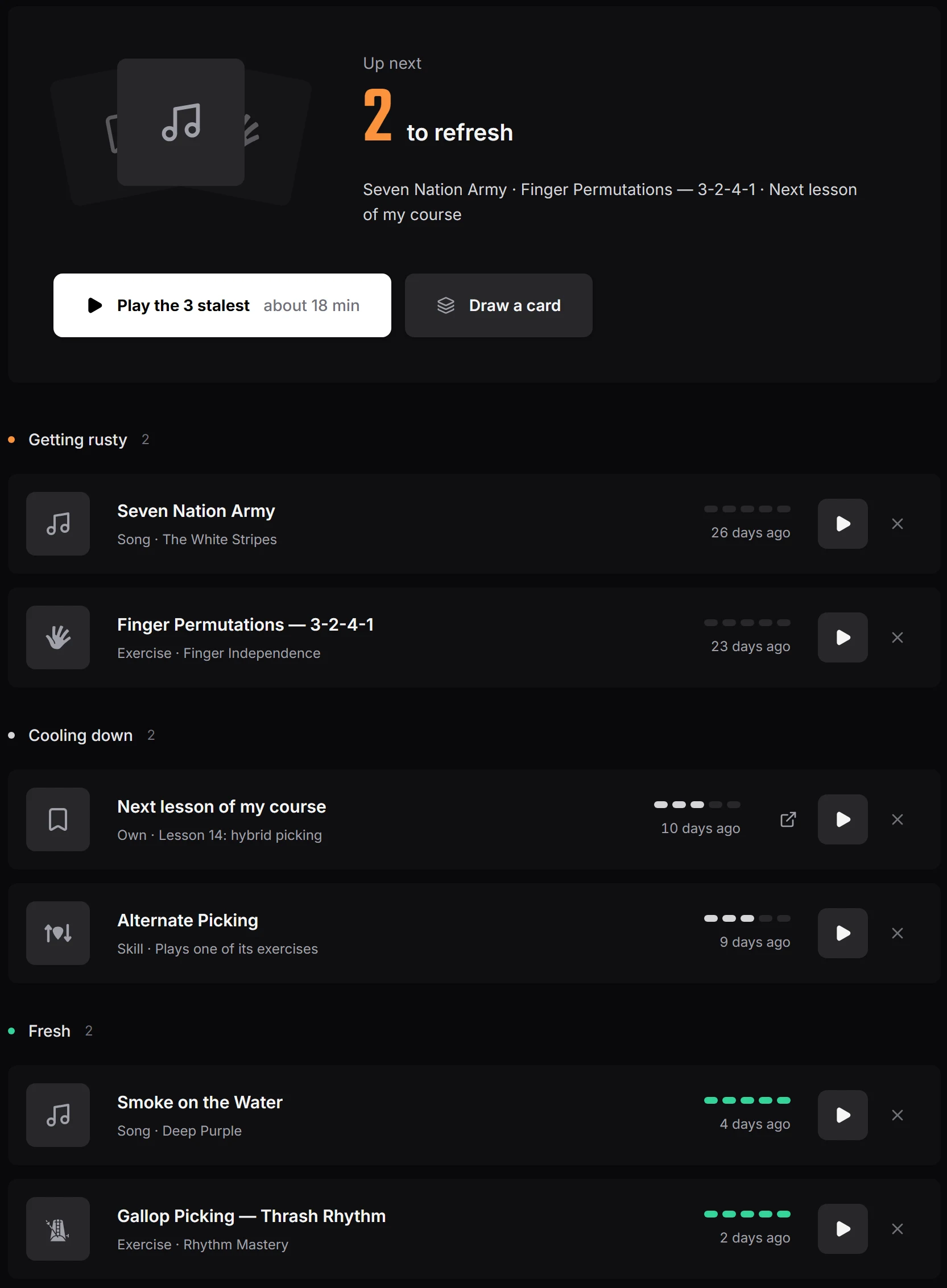
- Fresh, cooling down, getting rustyPlayed within 7 days is fresh, up to 21 is cooling down, after that it is getting rusty. Five dots drain day by day, and the stalest rise to the top.
- Play the 3 stalestOne tap puts the three you have not played for longest into a short session: 5 minutes per song, exercises at their usual length.
- Or draw a cardFor days you want to play but not to choose: one random item, more often something that has sat for a while.
Anything you play counts, wherever you play it: an exercise after 20 seconds, a song when you log it. An item of your own counts after a session on the free timer, or gets a tick if you leave the timer off.
Then
When the climb is done, choose
Reaching a goal ticks the exercise's speeds mastered up to the goal tempo. After that it is your call.
Raise the bar
A new goal is offered one step above the old one and about 10% faster: reach 120 BPM and the next one aims at 130. Change both before you save.
Or keep it where it is
Put the exercise in your rotation. It drains like everything else there and comes back up after 21 days without playing, so the tempo you climbed to does not slip away.
Why it exists
Two ways I used to waste practice
The first was playing the same drill at the same tempo for weeks, because nothing told me when it was time to push. A goal fixes that by putting a number at the top and making me earn each step on the way.
The second was the opposite: learning a song properly, then losing it a month later because I moved on and never came back. Rotation is the reminder I needed, a list that quietly shows what is going rusty.
Together they cover both halves of practice: getting better at something, and staying good at what you already have.

Michael Apfel
Guitarist & Creator of Riff Quest
Frequently asked questions
Every setting of a goal, step by step, is in the knowledge base: Exercise goals
Do I need a microphone?
For goals, yes: a run only counts when the microphone scores it. Rotation works without one, because anything you practise for long enough counts, logged or played.
Which exercises can take a goal?
Exercises with a tab and a metronome tempo, because those are the ones the microphone grades note by note. Your own exercises from the tab editor count too. Hunts, quizzes and songs cannot take one.
Do goals give points or Fame?
No. The practice time of a goal run logs like any other session, and reaching a goal shows up in the feed, but the reward is the tempo.
What counts as playing a rotation item?
Anything you play, wherever you play it: a rotation session, a routine, an exercise from the library or a song you log by hand. An exercise counts after 20 seconds. Sessions logged for an earlier day do not move anything.
Do I have to clear my rotation every day?
No. Nothing piles up and there is nothing to empty. It only tells you what you have not played for a while.
What happens when I reach a goal?
The exercise's speeds mastered go up to the goal tempo, and you are offered a new goal about 10% faster. If you would rather keep it where it is, put it in your rotation.