Desktop app
Plug in, and the app hears you the moment you play
Riff Quest for Windows, macOS and Linux reads your audio interface through its own driver instead of the browser's microphone. Notes register sooner, the input stays steady, and you can practise through an amp, your NAM captures and your plugins.
- Windows
- macOS
- Linux
Free with your Riff Quest account · v0.2.2. Same progress as the browser.
 Riff Quest · Tone Studio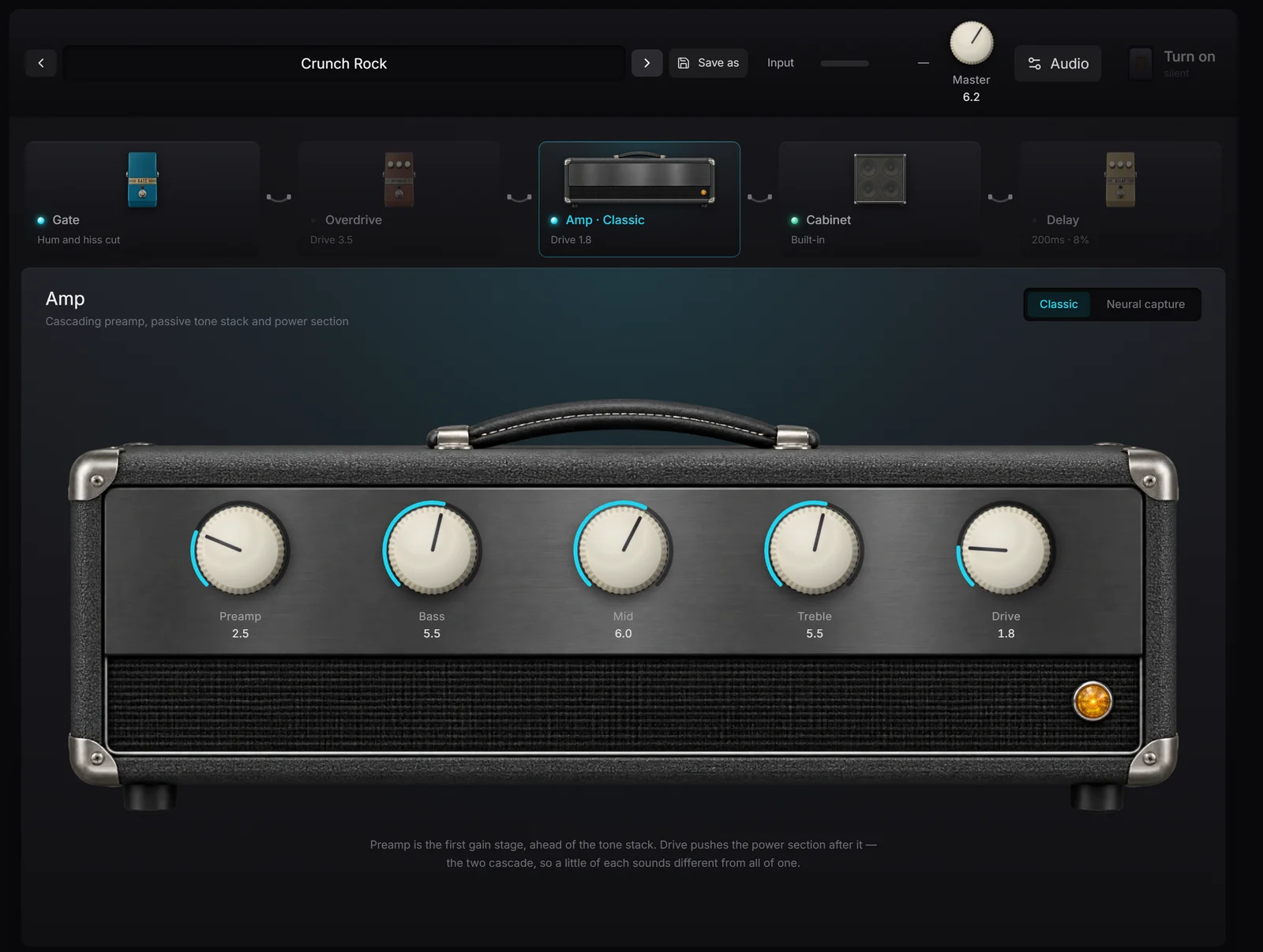
Guitar input
A browser is a bad place to plug a guitar into
In a tab, your guitar reaches Riff Quest through the system mixer and the browser's microphone code, which were built for video calls. The desktop app skips all of it.
- Straight off the driverThe app opens your interface itself, through ASIO or WASAPI on Windows and Core Audio on a Mac, instead of borrowing the browser's microphone.
- The right input, not just a devicePick the interface, then the channel your jack is on. An eight-input interface stops being a guessing game.
- Your buffer, your trade-offSet the buffer size yourself: smaller is quicker, too small crackles. The browser never lets you choose.
These latency figures were measured on one Windows computer with an audio interface on its ASIO driver. Yours depend on the interface and the buffer you pick.
Interface → Driver (ASIO, Core Audio) → Riff Quest
Interface → System mixer → Browser microphone → Web Audio → Riff Quest
Steady input
Sound that does not wait for the screen
The audio engine runs in a process of its own. Whatever the window is doing, drawing a long tab or loading the next exercise, the sound is handled first.
Dropouts in ten seconds of audio at 128 samples, with the app deliberately kept busy:
13–31
Audio sharing a process with the window
0
Audio in its own process, as the app ships
Tone Studio
Practise through an amp, not a dry signal
Plug straight into the interface and hear yourself through an amp, a cabinet and a couple of pedals while the exercise runs. Tone Studio exists only in the desktop app, because only the desktop app can play your guitar back without a noticeable delay.
Your captures, your cabinets
The amp has two engines. Classic is a preamp, tone stack and power section you dial in with five knobs. Neural capture loads a NAM file, a model of a real amp made with the open source Neural Amp Modeler, and plays it with the same core that project uses. Swap the built-in cabinet for any impulse response you own, and save the whole chain as a preset.
Or bring your plugins
Switch Tone Studio to its VST mode and build a rack from the VST3 plugins you already own: any order, the same plugin twice if you like, each opening its own window. On Windows and Apple Silicon Macs.
The small things
Built for an hour with a guitar in your hands
- Your screen stays onReading a tab with both hands on the guitar means no mouse for minutes. The app keeps the display awake while you play.
- Progress on the taskbarThe taskbar or dock icon fills up as the exercise runs, so a glance tells you how much is left.
- Quick jumps from the trayHome, My Exercises or the Practice Log, straight from the tray icon, without hunting for the window.
- Your own backing tracksLoad an mp3, wav or flac from your disk as a song's backing track and line it up with the tab.
- Updates itselfNew versions download in the background and install on a restart you choose.
- Same account, same progressEvery session counts exactly as it does in the browser: same points, same streak, same rankings.
Honestly
Do you need it?
Riff Quest runs fine in a browser, and nothing about practising, logging or ranking needs the app.
You play electric through an audio interface
Yes, easily. This is the setup it was built for.
You want to hear an amp while you practise
Yes. Tone Studio only exists in the desktop app.
You play acoustic into a laptop microphone
Not really. Detection works in the browser and you gain little.
You practise on a phone, a work laptop or an Intel Mac
Stay on the website. Nothing about your progress is missing there.
Download
Pick your system
One file each, from the latest release. Sign in with your Riff Quest account once it opens.
The first launch asks once
The builds are not signed with a paid certificate yet. On Windows, SmartScreen stops the installer: choose More info, then Run anyway. On a Mac, right-click the app and choose Open, then allow the microphone when asked, or the app hears nothing.
After that, it updates itself
New versions download in the background and you restart into them when it suits you. There is no Intel Mac build; on an Intel Mac, Riff Quest in the browser does everything except Tone Studio.
Install and set up, step by stepWhy it exists
I could feel the gap
I practise with the guitar plugged into an audio interface, and in the browser I could feel it: the note on screen lit up a moment after my fingers had already moved on. Calibration takes the offset out of the scoring, but it cannot make the app feel immediate.
So the desktop app goes around the browser. It opens the interface through its driver, the way recording software does, and keeps the audio in a process of its own so nothing on screen can interrupt it. Once the sound was in there, an amp to practise through was the obvious next step, and then the plugins I already owned.
It is still the same Riff Quest. If you play an acoustic into a laptop, the browser is honestly fine, and I would rather tell you that than have you install something you do not need.

Michael Apfel
Guitarist & Creator of Riff Quest
Frequently asked questions
Which file to pick, the first-launch warnings and the input settings are covered in the knowledge base: The desktop app, step by step
Is the desktop app free?
Yes. It comes with your Riff Quest account, which is free. Sign in with the same account you use in the browser.
Do I need it to use note detection?
No. Detection works in the browser through a microphone or an interface. The desktop app makes it quicker and steadier, because it reads the interface through its driver.
Why does Windows or macOS warn me about the installer?
The builds are not signed with a paid certificate yet, so the first launch is stopped once. On Windows choose More info, then Run anyway. On a Mac right-click the app and choose Open.
Does it work offline?
No. The app runs the same Riff Quest you see in the browser, so it needs a connection. If the connection drops it shows an offline screen and reconnects by itself.
Which plugins can I load?
VST3 plugins you own, on Windows and on Apple Silicon Macs, in any order, each with its own window. Tone Studio also loads NAM captures (.nam) and cabinet impulse responses (.wav) on every system.
Is there a version for Intel Macs?
Not at the moment. The Mac build is for Apple Silicon only, so on an Intel Mac use Riff Quest in the browser.
What the app is listening for
Interactive guitar practice
The tab scrolls and every note you hit is marked live. The desktop app is where this feels quickest.
OpenGuitar learning path
Step-by-step modules whose exams listen to you play, from first melody to the whole fretboard.
OpenGuitar roadmap for your goal
Phases and steps written around the player you want to be, each with something to play.
OpenPlug in. Play. It hears you.
Download the appNo account yet? Create one free, then sign in inside the app.