Table of Contents
- How We Evaluated the Best Apps for Guitar Practice
- Quick Comparison: Features and Pricing at a Glance
- Guitar Learning Apps for Beginners: Where to Start
- Tabs, Chord Charts, and Song Learning Tools
- Best Guitar Tuner App Plus Essential Utility Tools
- AI-Powered Feedback, Progress Tracking, and Advanced Practice
- How to Practice Guitar Effectively Using a Practice Ecosystem
- Guitar Practice Routine for Beginners: A Daily App Stack
- Which Is the Best App for Guitar Practice for You?
- Conclusion
Last Updated: May 22, 2026
Finding the best app for guitar practice is harder than it looks. The app stores are flooded with options, most reviews are shallow, and guitarists end up downloading three different apps and using none of them consistently. This guide from Riff Quest cuts through that noise by evaluating every major option across the criteria that actually matter: accuracy, depth, usability, and whether the app fits into a real practice routine. Below, we'll show you exactly how to build a complete practice ecosystem, not just pick a single app and hope for the best.
Here's what most guides get wrong: they treat guitar apps as standalone solutions. The reality is that no single app covers everything. The best approach is a small, intentional stack of two or three tools, each doing one thing exceptionally well.
Our top pick at a glance:

- Completely free for core progress tracking
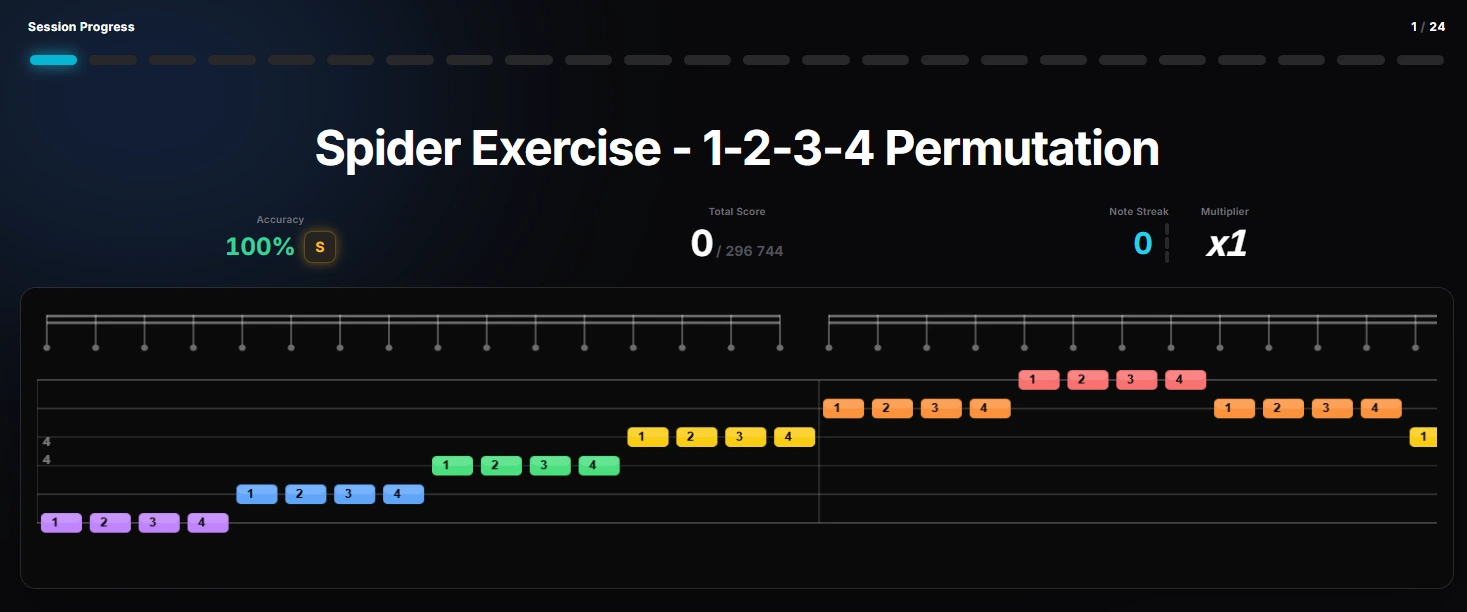
- 144 technical exercises with animated tabs
- Guitar Pro file import with color-coded, audio-synced tabs
- Points and ranking system for daily motivation
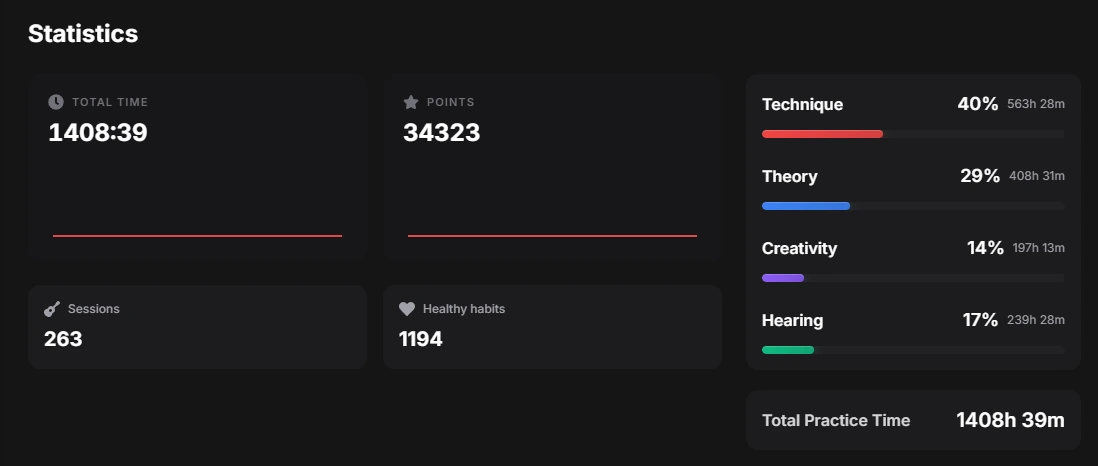
- Detailed stats dashboard showing where practice time goes
- Newer platform, so the community song library is still growing
Start tracking your practice free with Riff Quest, or read on for the full ranking and how each app fits into a complete practice stack.
How We Evaluated the Best Apps for Guitar Practice
Every app in this list was assessed against five criteria: accuracy of core function (tuning, tab playback, or feedback), depth of content, quality of user interface, pricing transparency, and offline functionality. Apps that scored well on marketing but poorly on actual practice utility were cut.
A guitar practice app is a software tool that helps guitarists develop specific skills, whether through structured lessons, song learning, rhythm training, or real-time feedback, by delivering guided, measurable practice sessions on iOS, Android, or desktop.
The evaluation also weighted how well each app handles beginner accessibility versus advanced practice needs. An app that's perfect for a first-week guitarist may be useless at six months in. That gap matters more than most reviews acknowledge.
Quick Comparison: Features and Pricing at a Glance
Before examining each app in detail, here's a snapshot of how the top options compare across the features that matter most for daily practice.
| App | Starting Price | Free Tier | Best For | Platform |
|---|---|---|---|---|
| Riff Quest | Free | Yes (always free) | Progress tracking, technique | Web |
| JustinGuitar | Free (freemium) | Yes | Structured beginner learning | iOS, Android |
| Yousician | $14.99/month | Limited | Gamified motivation | iOS, Android |
| Simply Guitar | $9.99/month | Limited | Families, visual learners | iOS, Android |
| Ultimate Guitar | $9.99/month | Limited | Tabs and chord database | iOS, Android, Web |
| Songsterr | $9.99/month | Limited | MIDI playback, tab accuracy | iOS, Android, Web |
| GuitarTuna | $2.99/month | Yes | Tuning and utilities | iOS, Android |
| Gibson App | $129.99/year | No | AI feedback, premium learning | iOS, Android |
| Coach Guitar | $9.99/month | Limited | Visual fretboard learning | iOS, Android |
| Fender Play | $19.99/month | No | Video-based song learning | iOS, Android |
If budget is tight, start with Riff Quest (free), JustinGuitar (free), and GuitarTuna (free core features). That three-app stack covers progress tracking, structured lessons, and accurate tuning without spending anything.
Guitar Learning Apps for Beginners: Where to Start
The single biggest mistake beginners make is starting with a tab app. Tabs are great once you know what you're doing. Without foundational technique, reading a tab is like reading a recipe without knowing how to hold a knife.
For beginners, the priority order is: structured learning path first, song-based motivation second, tab access third. The apps below deliver exactly that sequence.
JustinGuitar: Best Free Structured Learning Path
JustinGuitar is the gold standard for free structured guitar education. The curriculum, built by instructor Justin Sandercoe, follows a logical progression through beginner grades 1, 2, and 3, covering chord transitions, strumming patterns, music theory basics, and fretboard familiarity. The integrated song player includes adjustable tempo and lyrics, which is genuinely useful for practice rather than performance.
- Exceptional instruction quality
- Strong free content foundation covering real technique
- Built-in tuner and practice assistant
- Interface feels less polished than gamified competitors
- Advanced features sit behind a paid subscription
What most reviews miss about JustinGuitar is that the free content is genuinely complete for the first year of learning. You don't hit a paywall at a critical moment. That's rarer than it sounds.
Yousician: Best Gamified Practice for Motivation
Yousician treats guitar practice like a video game, and for a specific type of learner, that's exactly what they need. The app listens to your playing through the device microphone and delivers real-time feedback on timing and accuracy, turning chord changes and scale runs into scored challenges.
- Highly engaging interface that builds daily habits
- Multi-instrument support (guitar, bass, ukulele, piano)
- Gamified streaks and challenges sustain motivation
- Can feel disconnected from traditional music education
- Full song library requires the Premium+ subscription
The honest limitation: Yousician's gamification is its strength and its weakness. Players who need motivation thrive. Players who want deep music theory or ear training will outgrow it within a year.
Simply Guitar: Best for Families and Visual Learners
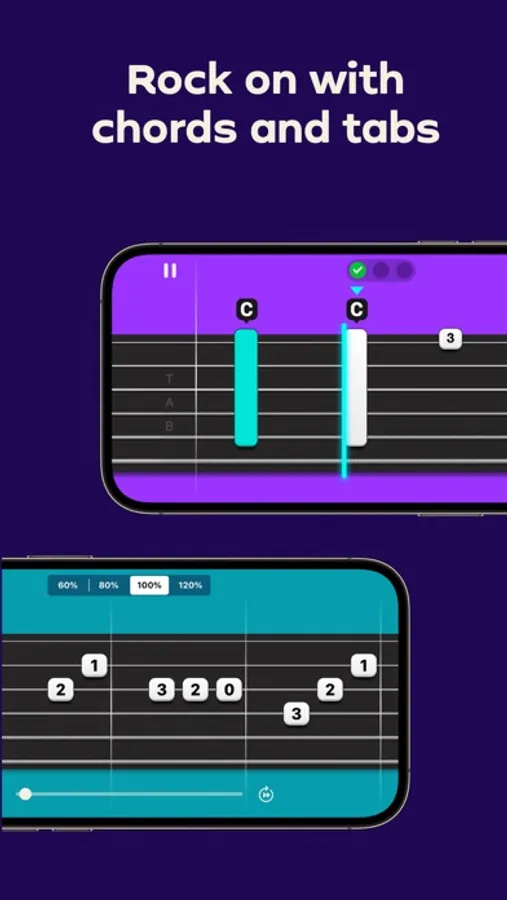
Simply Guitar earns its place by solving a problem the other apps ignore: multiple learners in one household. Up to five profiles per account means a family can share one subscription without losing individual progress tracking. The interface uses real-time microphone feedback to confirm chord accuracy, and the visual design is clean enough that a ten-year-old and a forty-year-old can both navigate it without frustration.


- Intuitive design with minimal clutter
- Excellent family value with five profiles
- Step-by-step interactive lessons with immediate feedback
- Content depth drops off sharply for intermediate players
- Must complete basics before unlocking the full library
Simply Guitar is best for families with one or two members picking up guitar at the same time, or for visual learners who struggle with notation-heavy instruction.
Tabs, Chord Charts, and Song Learning Tools
Once you've built basic technique, song learning becomes the primary driver of progress. This is where guitar tabs and chord charts become essential, and the quality of the tab platform you choose has a direct impact on how efficiently you learn. What almost no guide addresses is that the right tab platform depends heavily on the genre you're playing. A jazz guitarist and a metal guitarist have fundamentally different needs from a tab app, and treating them as interchangeable is one of the most common reasons players end up frustrated with tools that technically work fine.
Ultimate Guitar: Largest Tab and Chord Database
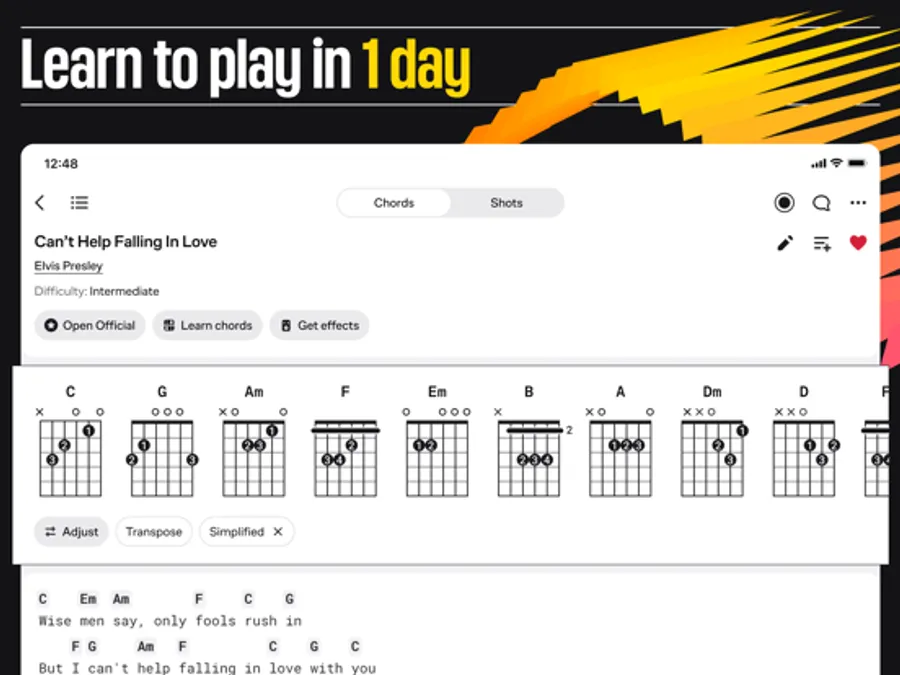
The numbers are hard to argue with: Ultimate Guitar hosts over 2 million tabs and chord charts across virtually every genre. For any song you want to learn, there's almost certainly a version available, often multiple versions at different difficulty levels. The built-in metronome, tuner, and transpose tools mean you can adjust a song to your current skill level or capo position without leaving the app.

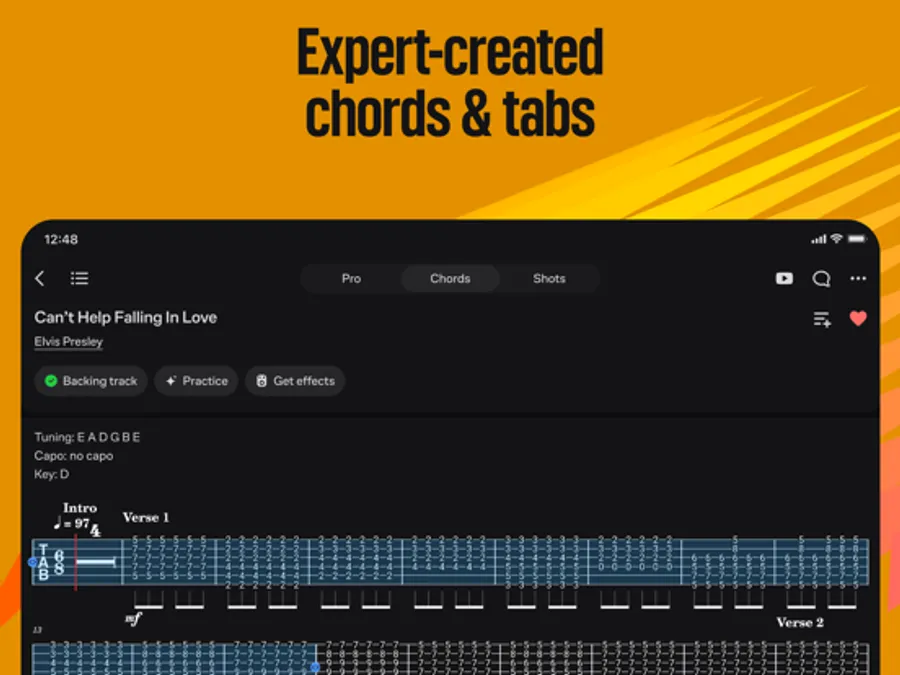
- Unmatched library size across all genres
- Interactive Practice Mode with AI performance tracking
- Transpose and speed tools built in
- Community-submitted tabs vary significantly in accuracy
- The best experience requires a paid subscription
The quality variance is real. For popular songs, the top-rated tabs are usually accurate. For deeper cuts or niche artists, you may need to cross-reference with Songsterr or your own ear.
Genre fit: Ultimate Guitar's sheer volume makes it the default choice for rock, pop, and country players, where the most-played songs have dozens of community versions to cross-reference. Blues players will find solid chord charts for standards. However, jazz players should be cautious, chord voicing accuracy in jazz tabs varies widely, and many community submissions simplify extended chords (9ths, 11ths, 13ths) down to basic triads that won't train your ear correctly.
Songsterr: Best for MIDI Playback and Tab Accuracy
Songsterr takes a different approach: a smaller library, but higher quality control. Tabs use realistic MIDI playback with speed control, loop functionality, and the ability to solo or mute individual instruments. For learning a complex guitar part in isolation, this is the superior tool.

- High transcription accuracy and consistency
- Excellent playback tools for isolating difficult sections
- Dark mode and clean modern interface
- Smaller library than Ultimate Guitar
- Advanced features locked behind subscription
If you're working on a technically demanding song, Songsterr's looping and pitch-shifting tools will save you significant time compared to manually rewinding a video lesson.
Genre fit: Songsterr is the strongest option for metal and progressive rock players. The ability to isolate a single guitar track from a full band arrangement, and loop a four-bar riff at 60% speed, is exactly what you need when learning a technically demanding part. The MIDI playback also renders complex rhythmic figures (polyrhythms, odd time signatures) more accurately than a community-recorded audio tab ever could.
Genre-Specific Tab and Learning Tool Recommendations
This is the angle almost no guitar app guide covers, and it's one of the most common pain points for intermediate players who feel like the standard app recommendations don't fit their playing style.
Jazz players: Neither Ultimate Guitar nor Songsterr is the primary tool you want. iReal Pro ($19.99 one-time) is the industry standard for jazz practice, it provides accurate chord charts for over 1,400 jazz standards, with full band backing tracks that respond to tempo and feel changes in real time. The chord voicings are correct, the rhythm section swings authentically, and you can transpose any chart to any key instantly. Jazz educators and working musicians use it as a rehearsal tool, not just a learning app. For notation-accurate jazz solos, Hal Leonard's iGigBook or PDF imports into forScore give you lead sheet accuracy that tab platforms can't match.
Classical players: Tab is largely the wrong format for classical guitar. Classical technique depends on reading standard notation, understanding voice leading, and executing precise right-hand fingering, none of which tabs communicate reliably. Noteflight and MuseScore (free, with a paid tier) provide notation-first environments where you can import or browse classical scores and hear accurate MIDI playback. For structured classical method work, apps like Lessonface connect you with human instructors, which matters more in classical than in any other genre because technique errors compound quickly without correction.
Metal and hard rock players: Songsterr is your primary tab tool for the reasons above. Supplement it with the Guitar Pro mobile app ($9.99 one-time on mobile), which lets you open .gp files, the most accurate tab format available, with full multi-track playback, individual instrument isolation, and a built-in RSE (Realistic Sound Engine) that renders guitar tones more convincingly than generic MIDI. Many professional transcriptions are distributed in .gp format, and having a dedicated viewer for those files is worth the one-time cost.
Blues players: Ultimate Guitar's chord chart library covers the standard 12-bar progressions well, but the real practice tool for blues is a backing track app with authentic feel. The blues shuffle rhythm, and the micro-timing variations that make it feel right, is nearly impossible to internalize from a tab alone. Apps like iReal Pro and Jam Tracks (available on both iOS and Android) provide backing tracks specifically built around blues progressions in all 12 keys, with adjustable tempo so you can start slow and build up.
If you're unsure which tab platform to start with, use this rule: if you're learning songs from a specific artist or album, start with Songsterr for accuracy. If you're exploring broadly across a genre, start with Ultimate Guitar for coverage. Add the genre-specific tool above once your practice routine is consistent.
Offline Tab Access: What You Actually Get on Each Platform
Offline functionality is a real differentiator that most tab app reviews ignore. If you practice in a basement, a studio without Wi-Fi, or while traveling, an app that requires a constant connection is an app you won't use consistently.
- Ultimate Guitar Pro: Allows offline saving of individual tabs. You must manually save each tab while connected; there's no bulk download. Saved tabs are accessible without a connection.
- Songsterr Plus: Supports offline access for downloaded songs on the paid tier. MIDI playback works offline once a song is cached.
- iReal Pro: Fully offline after initial download. The entire chord chart library and all backing track playback work without any internet connection, one of its strongest practical advantages.
- Guitar Pro mobile: Fully offline. Files are stored locally and all playback features work without a connection.
For players who practice in low-connectivity environments, iReal Pro and Guitar Pro mobile are the most reliable options in this category.
Best Guitar Tuner App Plus Essential Utility Tools
Accurate tuning is non-negotiable. A guitar that's even slightly out of tune trains your ear incorrectly and makes chord charts sound wrong even when your technique is right. But tuning is just the entry point, this section covers the full utility layer of your practice ecosystem: tuning, metronome work, backing tracks, and the hardware integration angle that almost no guitar app guide addresses.
GuitarTuna: Industry-Standard Tuning Accuracy
GuitarTuna has earned its reputation through one thing done exceptionally well: accurate, fast chromatic tuning across standard and custom tunings. The core tuning function is free and works reliably even in moderately noisy environments. Beyond tuning, the app includes interactive chord games, a built-in metronome, and jam tracks, making it a lightweight utility hub rather than just a tuner.


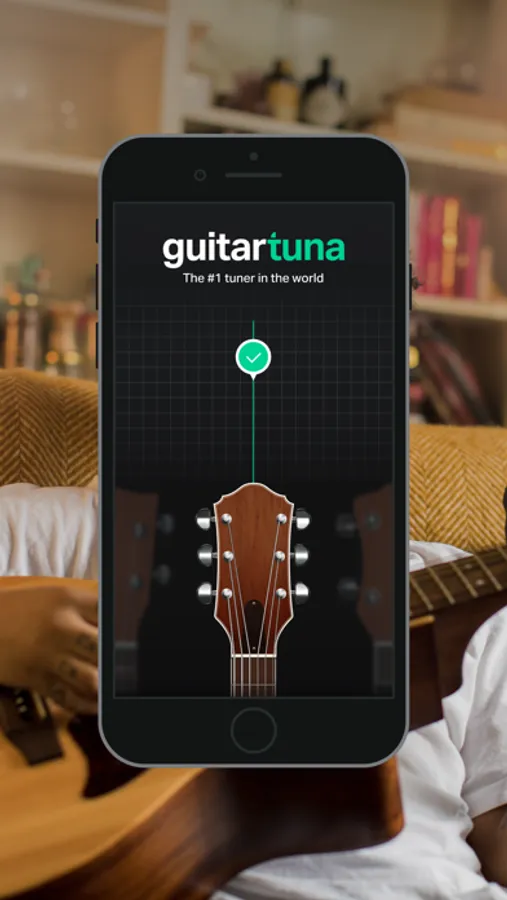
- Industry-standard accuracy for pitch detection
- Fast and easy to use mid-practice
- Chord trainer and metronome included at no cost
- Not a comprehensive learning platform
- Advanced tools require payment
Keep GuitarTuna as a permanent fixture in your practice stack regardless of which learning app you use. Tuning takes thirty seconds and prevents twenty minutes of confused practice.
A note on tuning method: GuitarTuna uses your device's built-in microphone by default. In a quiet room, this is accurate enough for most players. In a noisy environment, a rehearsal space, a room with a TV on, outdoors, microphone-based tuning becomes unreliable. This is where hardware integration becomes relevant (covered below).
Metronome Apps: The Underinvested Practice Tool
Rhythm training is the most underinvested area of most guitarists' practice routines. Many players can play a chord correctly in isolation but fall apart when asked to hold a steady tempo or lock in with a backing track. A dedicated metronome app does more than click, the best ones teach you to internalize rhythm rather than just follow it.
Tempo by Frozen Ape (free, iOS/Android) is the most widely recommended standalone metronome among working musicians. It supports compound time signatures, polyrhythmic subdivisions, and accent patterns, features that matter once you move past 4/4 strumming. The visual pulse display helps players who struggle to hear the click in a mix.
Pro Metronome (free with paid tier, iOS/Android) adds a tap-tempo function, visual beat display, and the ability to program tempo changes within a single session, useful for practicing songs that have a ritardando or accelerando section.
For beginners, GuitarTuna's built-in metronome is sufficient. For intermediate players working on timing precision, a dedicated metronome app with subdivision control is worth adding to the stack.
Backing Track Apps: Training Your Ear in Context
A metronome trains you to keep time. A backing track trains you to play music. The difference is significant: locking in with a drummer and bassist, even a virtual one, develops the micro-timing adjustments and dynamic awareness that isolated practice cannot replicate.
iReal Pro ($19.99 one-time, iOS/Android/Mac) is the most versatile backing track tool available. It generates full band accompaniment, drums, bass, piano, and optional horn voicings, from chord charts, with adjustable tempo, feel (straight vs. swing), and style. The library includes over 1,400 jazz standards and supports user-created charts for any genre. For blues, rock, and pop players, you can build a 12-bar blues in any key in under a minute and have a full band to play over immediately.
Jam Tracks apps (several versions available on iOS and Android, ranging from free to $9.99) provide pre-recorded backing tracks organized by key, tempo, and genre. These are less flexible than iReal Pro but more sonically realistic, the drums and bass are recorded by real musicians rather than generated, which some players find easier to lock in with.
Loopy Pro ($12.99 one-time, iOS) takes a different approach: it's a live looper that lets you build your own backing tracks by recording layers in real time. For players who want to practice improvisation over their own chord progressions, or who want to develop looping as a performance skill, Loopy Pro is the most capable mobile option available.
The most effective backing track practice method is to start at 70-75% of the target tempo, play through the full progression without stopping, then increase tempo by 5 BPM increments. Most players jump to full tempo too quickly and reinforce timing errors rather than correcting them.
Hardware-Software Integration: Audio Interfaces and Latency
This is the angle most guitar app guides completely ignore, and it has a direct impact on how useful real-time feedback apps actually are in practice.
When you practice through your phone's built-in microphone, there is always latency, the delay between playing a note and the app registering it. For casual chord practice or tuning, this is tolerable. For real-time feedback apps like Yousician or the Gibson App, latency above roughly 10-15 milliseconds makes the feedback feel disconnected from your playing and reduces its training value significantly. On many devices, microphone-based input through these apps runs at 30-50ms of latency or higher, depending on the device and ambient noise conditions.
An audio interface, a small hardware device that connects your guitar directly to your phone or computer via a dedicated analog-to-digital converter, reduces round-trip latency to near-zero and eliminates ambient noise interference entirely.
Entry-level options worth knowing:
- IK Multimedia iRig HD 2 (approximately $99): Connects directly to iPhone Lightning or USB-C. Compatible with GarageBand, Yousician, AmpliTube, and most iOS guitar apps. Plug-and-play with no driver installation required on iOS.
- Focusrite Scarlett Solo (approximately $119): The most widely recommended entry-level interface for desktop practice. Connects via USB to Mac or PC. Works with any DAW or desktop guitar app. Extremely low latency with ASIO drivers on Windows.
- IK Multimedia iRig 2 (approximately $39): The budget option. Connects via the headphone jack (3.5mm TRRS). Latency is higher than the HD 2 but still significantly better than microphone input. Compatible with virtually any smartphone.
For apps that support direct input, including GarageBand, AmpliTube, and the Gibson App on supported devices, a direct connection also unlocks more accurate chord detection and note recognition features that microphone-based input cannot reliably deliver, especially for distorted or heavily processed guitar tones.
Practical setup for mobile practice:
- Connect your guitar to the iRig HD 2 (or equivalent).
- Plug headphones into the interface's headphone output (not the phone's).
- Open your feedback app (Yousician, Gibson App, or Riff Quest).
- Set input source to the interface in the app's audio settings if prompted.
The improvement in feedback accuracy and responsiveness is immediate. Players who tried a real-time feedback app through the microphone and found it frustrating often find the same app genuinely useful once they switch to direct input.
Not all guitar apps support low-latency audio interfaces on Android. iOS has more consistent support for third-party audio interfaces across apps. If you're on Android and latency is a priority, check the specific app's support documentation before purchasing an interface.
Ear Training: The Utility Layer Most Apps Skip
Ear training is the utility function that accelerates every other area of guitar practice, and it's the one almost no guitar app addresses directly. Being able to identify intervals, chord qualities, and common progressions by ear makes tab learning faster, improvisation more intuitive, and mistakes easier to self-correct.
Tenuto (free, iOS) and EarMaster ($9.99 one-time, iOS/Android) are the two most structured ear training apps available. Both cover interval recognition, chord identification, rhythm dictation, and melodic dictation through progressive exercises. EarMaster is the more comprehensive of the two, with a structured curriculum that mirrors what music schools teach.
For guitarists specifically, Functional Ear Trainer (free, iOS/Android) takes a different approach: rather than teaching abstract interval names, it trains you to recognize how scale degrees feel in the context of a key, which is more directly applicable to playing by ear and improvising than classical interval training alone.
Adding 5-10 minutes of ear training to your daily practice stack produces compounding returns over time. It's the investment that makes every other app on this list more effective.
AI-Powered Feedback, Progress Tracking, and Advanced Practice
Real-time feedback changes how quickly you learn. The difference between practicing with feedback and practicing without it is the difference between knowing you're playing correctly and assuming you are.
Gibson App: Premium AI Feedback and Real-Time Response
The Gibson App uses Audio Augmented Reality (AAR) technology to provide real-time note recognition and feedback during lessons. It's the most technically sophisticated feedback system on this list, with built-in digital amps and pedals for tone shaping and curated lessons from professional educators. The interface is polished and the feedback is genuinely reliable.

- Accurate and responsive real-time feedback
- Excellent modern interface
- Built-in amp and pedal simulation
- Highest price point on this list
- Smaller song library than specialized tab apps
The price is the honest barrier. At $129.99 per year, the Gibson App costs more than most competitors combined. For players who are serious about structured, feedback-driven learning and have the budget, it delivers. For casual learners, the cost is hard to justify.
Riff Quest: Free Progress Tracking with Animated Tabs
Riff Quest occupies a unique position in the guitar app ecosystem: it's the only platform on this list that makes progress tracking its primary function, and it's completely free to use for that purpose. Most guitar apps focus on delivering content. Riff Quest focuses on making sure your practice of that content actually sticks.
The platform includes 144 built-in technical exercises with animated Guitar Pro tabs, giving players a structured technique library that covers the exercises most likely to produce real improvement. The ability to import Guitar Pro files with color-coded, audio-synchronized tabs means you can bring your own song repertoire into the tracking system rather than being limited to a curated library.
The points and ranking system works like Guitar Hero on a real guitar, adding a competitive layer that makes consistent daily practice genuinely engaging. The community-rated song library prioritizes quality over algorithmic popularity, which means the songs that surface are ones players actually find useful.
- Completely free for core progress tracking
- 144 technical exercises with animated tabs
- Guitar Pro file import with color-coded, audio-synced tabs
- Points and ranking system for daily motivation
- Detailed stats dashboard showing where practice time goes
- Newer platform, so the community song library is still growing
The stats dashboard is the feature that separates Riff Quest from every other app on this list. Seeing exactly where your practice time is going, which songs are progressing, which techniques are stalling, changes how you make decisions about what to work on next.
How to Practice Guitar Effectively Using a Practice Ecosystem
The throughline of this entire guide is this: no single app is the best app for guitar practice in isolation. The apps that produce the fastest improvement are the ones used together, intentionally, as a coordinated system.
A practice ecosystem is a coordinated set of tools covering tuning, technique, song learning, and progress tracking, used in a consistent daily routine rather than randomly across different sessions.
Hardware-Software Integration: Audio Interfaces and Latency
This is the angle most guitar app guides completely ignore. Practicing through your phone's built-in microphone introduces latency, the delay between playing a note and the app registering it. For casual chord practice, that's tolerable. For real-time feedback apps like Yousician or the Gibson App, high latency makes the feedback meaningless.
An audio interface, a small device that connects your guitar directly to your phone or computer, reduces latency to near-zero. According to Sweetwater's guide to audio interfaces for guitarists, interfaces in the $50-$100 range are sufficient for most practice applications. The improvement in feedback accuracy is immediate and significant.
For apps that support MIDI input, a direct connection also opens up more accurate chord detection and notation features that microphone-based input can't reliably deliver.
Offline Functionality and Genre-Specific App Considerations
Offline functionality matters more than most reviews acknowledge. If your practice space doesn't have reliable internet, an app that requires a constant connection is an app you won't use consistently.
Among the apps on this list: GuitarTuna works fully offline for tuning. Songsterr and Ultimate Guitar allow offline access to downloaded tabs on paid plans. Riff Quest's core tracking and exercises function offline once loaded. Yousician and the Gibson App require an active connection for most features.
Genre also shapes which apps belong in your stack. Blues players benefit from backing track apps with authentic swing feel. Classical guitarists need accurate notation software rather than tab-only platforms. Metal players learning complex riffs will get more from Songsterr's MIDI playback and looping tools than from a video lesson platform. Match your tools to your genre, not just your skill level.
Relying on a single all-in-one app is the most common practice mistake. When that app's content library doesn't include the song you want to learn, or its feedback system doesn't match your playing style, you stop practicing. A two or three-app stack removes that single point of failure.
Guitar Practice Routine for Beginners: A Daily App Stack
A guitar practice routine for beginners works best when it's short, specific, and consistent rather than long and irregular. Thirty minutes daily beats two hours on weekends. Here's a practical daily stack built from the apps above.
Daily 30-Minute Beginner Stack:
- Tune up with GuitarTuna (2 minutes)
- Complete one JustinGuitar lesson or review a previous one (10 minutes)
- Work on a specific technique exercise in Riff Quest (8 minutes)
- Practice a song section using Songsterr's loop and speed tools (8 minutes)
- Log your session and update progress in Riff Quest (2 minutes)
The logging step is the one most beginners skip. It's also the step that separates players who improve steadily from those who feel like they've been practicing for months without getting better. According to research on deliberate practice and skill acquisition, tracking specific outcomes in skill development accelerates improvement by making progress visible and identifying sticking points early.
The spectrogram view in some advanced apps and the chord detection features in others are worth exploring once this basic stack feels automatic. Add complexity only after the routine is solid.
Which Is the Best App for Guitar Practice for You?
The honest answer depends on what's actually blocking your progress. Here's a direct framework:
If you're a complete beginner: Start with JustinGuitar for structure and Riff Quest for tracking. Add GuitarTuna for tuning. That's your full stack for the first three to six months.
If motivation is your problem: Add Yousician to the stack. The gamified feedback and streak system are genuinely effective for building the daily habit.
If you want to learn specific songs: Ultimate Guitar for breadth, Songsterr for accuracy on complex parts. Use both.
If you want premium AI feedback: The Gibson App is the best option, provided the annual cost fits your budget.
If you're an intermediate player who's lost track of progress: Riff Quest's stats dashboard and technique library are the most direct solution. The detailed overview of where your practice time goes often reveals why progress has stalled.
According to research on habit formation and behavioral consistency, the best practice tool is the one you actually use every day. An app you open once and abandon is worse than a simple notebook. Consistency beats sophistication every time.
For genre-specific needs: blues and jazz players should prioritize backing track apps with authentic rhythm feel. Classical players need notation-first tools. Rock and metal players will get the most from accurate tab platforms with looping and pitch-shifting capabilities.
Frequently Asked Questions
What is the best free app for learning guitar?
JustinGuitar is widely considered the best free guitar learning app for beginners. It offers a structured, step-by-step curriculum with comprehensive beginner grades, a built-in tuner, and an integrated song player, all at no cost. Riff Quest is another strong free option, offering permanent free progress tracking, 144 built-in technical exercises with animated tabs, and a community-rated song library, making it ideal for guitarists who want measurable improvement.
Which guitar app is best for beginners building a practice routine?
For beginners building a guitar practice routine, JustinGuitar or Simply Guitar provide the clearest structured learning paths. Pair either with GuitarTuna for accurate tuning and Riff Quest for tracking your progress across songs and techniques. This combination covers the core elements of an effective beginner practice routine: structured lessons, reliable tuning, rhythm training, and visible improvement over time, without requiring a large subscription budget.
Can you learn guitar effectively just by using an app?
Apps can take you surprisingly far, especially for foundational skills like chord charts, basic music theory, fretboard navigation, and song learning. Apps with real-time feedback, such as Yousician or the Gibson App, add interactive exercises that accelerate early progress. However, most players benefit from occasional human feedback to correct technique issues that microphones and AI may miss. Using the best app for guitar practice as a daily practice tool, alongside periodic lessons, is generally the most effective approach.
Do I need a paid subscription to get value from guitar practice apps?
No. Several top apps offer strong free tiers. JustinGuitar's free content covers extensive beginner and intermediate material. GuitarTuna's core tuner is free. Riff Quest's progress tracking and technical exercises are permanently free. Ultimate Guitar and Songsterr offer limited free access to their tab databases. Paid subscriptions on apps like Yousician or Fender Play unlock full song libraries and advanced features, but a thoughtful combination of free apps can build a complete and effective practice ecosystem.
How do I choose the right guitar practice app for my skill level?
Match the app to your current goal. Absolute beginners should prioritize structured learning paths, JustinGuitar or Simply Guitar work well. Intermediate players focused on song learning benefit most from tab platforms like Ultimate Guitar or Songsterr. Players wanting real-time AI feedback should consider Yousician or the Gibson App. For tracking long-term progress across techniques and building consistent daily habits, Riff Quest fills a gap that most individual apps leave open. Combining two or three apps by function is often more effective than relying on a single platform.
Inconsistent practice and unclear progress are the two things that stop most guitarists from improving. Riff Quest was built specifically to solve both problems, with a free-forever progress tracking system, 144 animated technical exercises, Guitar Pro file import with audio-synchronized tabs, and a detailed stats dashboard that shows exactly where your practice time is going. Start your guitar progress with Riff Quest and turn your next practice session into measurable improvement.